Requiring 2FA for package publishing and settings modification
See Details
Table of contents
All packages now require two-factor authentication (2FA) or a granular access tokens with bypass 2FA enabled for creating and publishing packages.
Modifying a package's settings also requires two-factor authentication (2FA).
For CI/CD workflows, consider using trusted publishing, which provides secure, token-free publishing that automatically enforces strong authentication without requiring manual token management.
Important notes about granular access tokens:
- Bypass 2FA configuration is set at token creation
- When bypass 2FA is disabled: The system will check account-level and package-level settings to determine if 2FA is required
- When bypass 2FA is enabled: The token will bypass all 2FA requirements at all times, regardless of account-level or package-level 2FA settings
- When Require two-factor authentication and disallow tokens is selected at the package level, granular access tokens cannot be used regardless of their bypass 2FA setting
Configuring two-factor authentication on package settings
-
On the npm "Sign In" page, enter your account details and click Sign In.
-
Navigate to the package on which you want to require a second factor to publish or modify settings.
-
Click Settings.

-
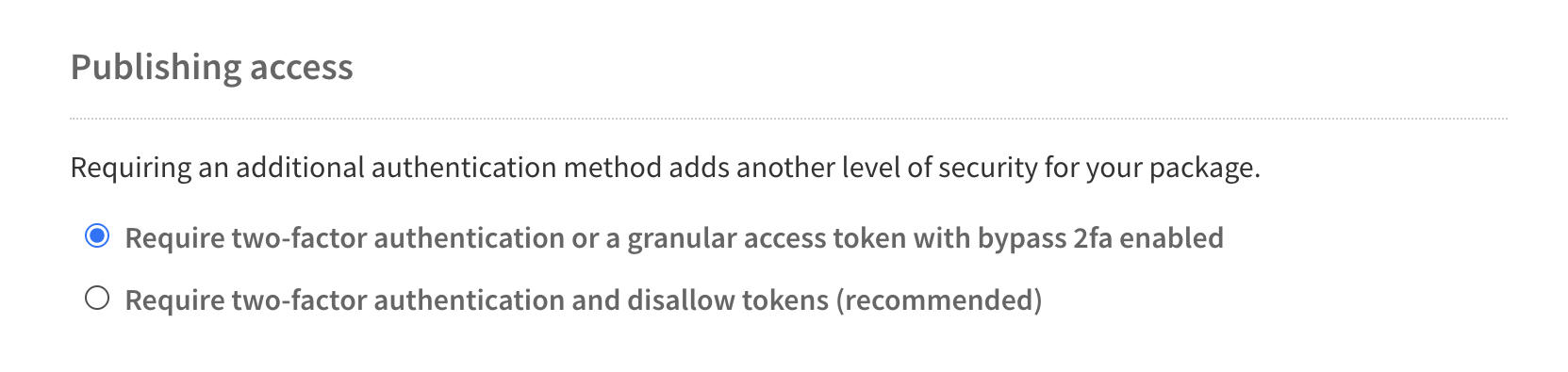
Under "Publishing access", select the requirements to publish a package.
- Require two-factor authentication or a granular access token with bypass 2fa enabled (Default)
This is the default option for all new packages. With this option, maintainers must have two-factor authentication enabled for their account. If they publish a package interactively, using thenpm publishcommand, they will be required to respond to a 2FA prompt when they perform the publish. However, maintainers may also create a granular access token with bypass 2FA enabled and use that for a non-interactive publish. - Require two-factor authentication and disallow tokens (Recommended) With this option, a maintainer must have two-factor authentication enabled for their account, and they must publish interactively. Maintainers will be required to respond to a 2FA prompt when they perform the publish. Granular access tokens cannot be used to publish packages, regardless of their bypass 2FA setting.
- Require two-factor authentication or a granular access token with bypass 2fa enabled (Default)
5 . Click Update Package Settings.


![dependabot[bot]](https://github.com/dependabot[bot].png?size=40)


